
Home Tech Land is reader-supported. When you buy through links on our site, we may earn a commission. As an Amazon Associate, we earn from qualifying purchases.
Last updated: . How we research: We build these guides from manufacturer instructions, safety agency guidance, and owner reports, and we update them when products or standards change. Learn more about Home Tech Land.
A wall-mounted TV frees up floor space and keeps the screen away from small hands, but only if it stays on the wall. Most interior walls in US homes are drywall over wood framing, and drywall by itself is too soft to hold a TV with ordinary screws.
This guide explains how to mount a TV on drywall the safe way: find the studs, match the mount to the TV, and use rated heavy-duty anchors only when the mount’s maker allows it.
Quick Answer: Bolt the mount’s wall plate into at least two wood studs with the lag bolts supplied, after confirming the studs with a stud finder and a small nail. Check that the mount matches your TV’s Video Electronics Standards Association (VESA) hole pattern and is rated above the TV’s weight. Use drywall-only anchors only when both the anchor and the mount maker rate them for your TV, and never with a mount whose instructions require studs.
Why Wood Studs Are the Safe Default
Studs are the vertical wood (or steel) framing behind the drywall. Home Depot’s stud-finding guide says they are usually spaced 16 or 24 inches apart, measured center to center. A lag bolt driven into the middle of a wood stud grips solid lumber, while drywall is pressed gypsum that can crumble around a fastener.
Mount makers build their ratings around that difference. Sanus’s instructions for one of its full-motion mounts say it is designed only for wood stud walls and warn that “drywall alone will NOT hold the weight of your TV.” Mounting Dream’s manual for a small fixed mount also says not to install into drywall alone and asks that the wall support five times the combined weight of the TV and mount.
Safety is the reason to get this right. The US Consumer Product Safety Commission (CPSC) advises families to mount flat-screen TVs to the wall or anchor them to furniture so they can’t topple, and to follow the manufacturer’s instructions when securing them. A mount that pulls out of the wall is just as dangerous.
Match the Mount to Your TV
VESA Pattern
The VESA pattern is the spacing of the threaded holes on the back of the TV, listed in millimeters as horizontal by vertical, such as 400 by 300. Find it in the TV manual or on the maker’s spec page, or measure center to center between the holes. The mount’s box and listing should include your exact pattern.
Weight Rating
Check the TV manual for the weight without the stand, since that is the weight the mount carries. Pick a mount rated above that number, and remember that soundbar brackets or other accessories add to the load. Our guide to the best TV wall mounts for 65-inch TVs compares mounts by weight rating and VESA range.
Mount Types
- Fixed: Sits flat and closest to the wall, so it puts the least leverage on the fasteners.
- Tilting: Angles the screen down a few degrees and stays close to the wall.
- Full-motion (articulating): Extends and swings the TV away from the wall. The farther it extends, the harder the weight levers outward on the top bolts. Toggler’s spec sheet notes that holding strength drops as the load moves farther from the wall.
Plan the Height and Viewing Distance
For seated viewing, CE Pro’s mounting guide puts the center of the screen at seated eye level, which works out to about 42 inches from the floor as a rule of thumb. If the TV must sit higher, such as over a fireplace, a tilting mount helps.
Screen size and seating distance go together, so run your numbers through our free TV size calculator before you drill. If you’re placing a set in a smaller room, our guide to the best TV size for a bedroom covers typical sizes and distances.
Tools You Need
- Stud finder, ideally one with a live wire warning
- Thin finishing nail and hammer to confirm studs
- Drill with the pilot bit size listed in the mount instructions
- Socket wrench or ratchet that fits the lag bolts
- Level (24 inches or longer is easiest for the wall plate)
- Tape measure, pencil, and painter’s tape
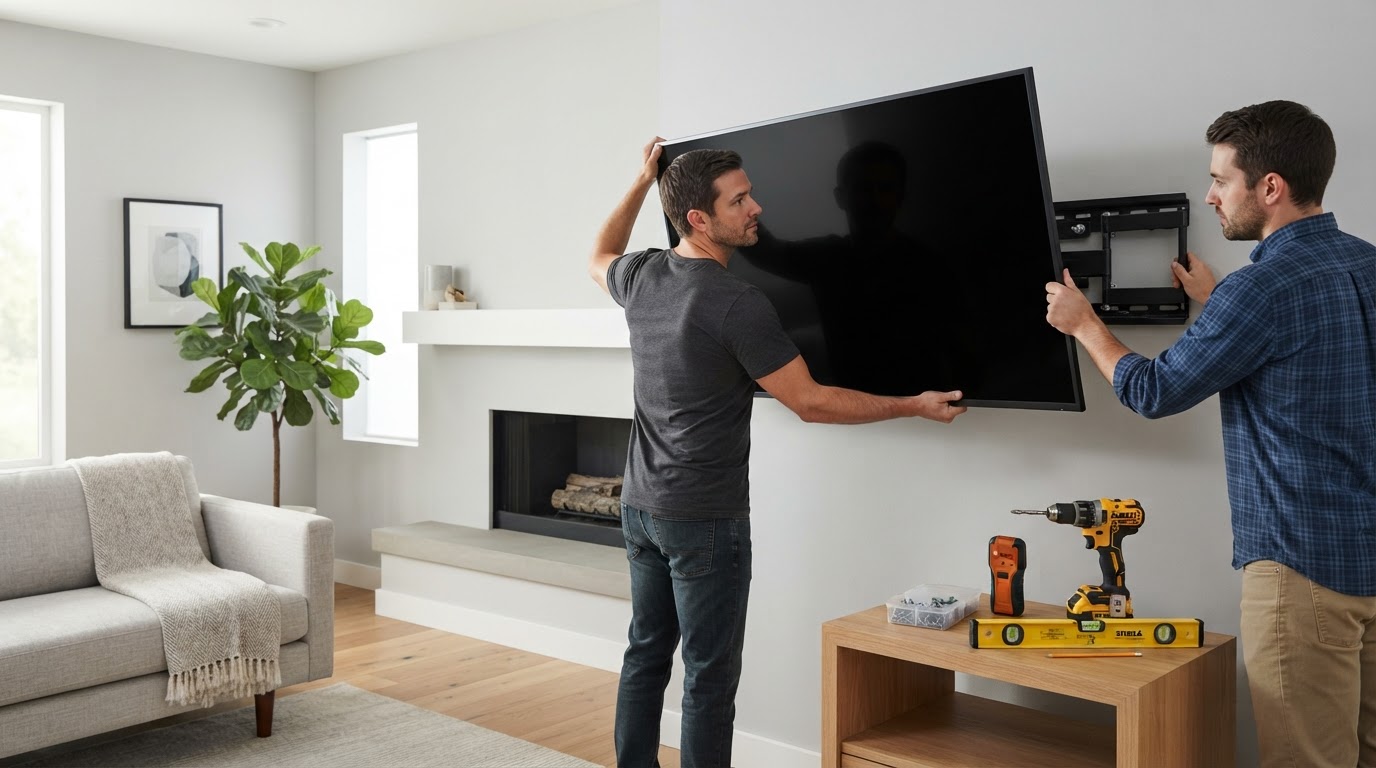
- A helper to lift and hang the TV
How to Mount a TV on Drywall Into Studs: Step by Step
- Confirm the TV’s weight and VESA pattern. Look up the TV’s weight without the stand and its VESA pattern in the manual or on the maker’s spec page. Make sure the mount lists that pattern and a weight rating above your TV’s weight.
- Pick the spot and height. Outline the screen with painter’s tape to judge size and height, aiming the screen’s center near seated eye level.
- Locate and confirm the studs. Mark both edges of each stud with a stud finder, then tap a thin finishing nail where the bolt will go. It should stop in solid wood about half an inch in.
- Check for wires and pipes. Use a live wire warning, note nearby plumbing, and avoid drilling directly above or below outlets and switches, where cables usually run.
- Mark the wall plate holes. Level the wall plate at the planned height and mark the bolt holes at the center of the studs, using every lag bolt the mount supplies.
- Drill the pilot holes. Drill straight into the center of each stud with the pilot bit size the mount’s instructions specify.
- Attach the wall plate. Drive the lag bolts and washers with a socket wrench until the plate sits flat and snug. Don’t overtighten.
- Attach the brackets to the TV. Lay the TV face down on a soft surface and bolt the brackets to the VESA holes with the screws and spacers that fit.
- Hang the TV and lock it. With a helper, lift the TV onto the plate and engage the safety screws or locking tabs so it can’t lift off.
- Manage the cables. Route cables through the mount’s clips, a surface raceway, or an in-wall power kit, then check the plate for any movement.
Always follow your mount’s own instructions where they differ from these general steps, including bolt sizes, pilot hole sizes, and the number of fasteners.
What to Do When the Studs Don’t Line Up
Studs rarely fall exactly where you want the TV. Safe options:
- Use a mount with a wide wall plate. Many larger mounts reach two studs 16 inches apart, and some reach 24 inches. Lateral shift lets you center the TV on an off-center plate.
- Add a horizontal board. Lag-bolt a sturdy board across two or three studs, then attach the mount to the board. The board now carries the full load, so fasten it securely.
- Pick a different spot. Moving the TV a few inches is often easier than fighting the framing.
When Drywall Anchors Are Acceptable
Drywall-only mounting is acceptable only when both the anchor and the mount are rated for it. Plastic plugs, self-drilling drywall anchors, and small spring toggles don’t qualify for a TV.
Heavy-duty strap toggles are the usual choice. Toggler’s spec sheet lists its SnapToggle BB (1/4-20 thread) at an ultimate shear load of 241 pounds and an ultimate pull-out load of 265 pounds in 1/2-inch drywall, with higher figures in 5/8-inch drywall. Toggler also states that industry standards recommend using one quarter of the ultimate load, so the working load per anchor is far lower, and says the figures can’t be guaranteed because wall condition varies.
Those ratings assume sound drywall and correctly drilled holes. Before relying on anchors, read the mount’s instructions: if they say to install only into wood studs, anchors aren’t an option for that mount, no matter how strong they are.
Metal Studs Need Different Hardware
Some homes, condos, and basements use thin steel studs. A magnet will stick to the screws in them, and many stud finders flag them. Lag bolts won’t hold in sheet steel, so you need a mount and hardware made for metal studs. Kanto, for example, says its LX600SW mount is designed for metal studs and ships with SnapToggle heavy-duty toggle bolts in place of lag bolts. If your mount doesn’t list metal studs, contact the maker or hire a pro.
Hide the Cables the Right Way
Section 400.12 of the National Electrical Code (NEC) says flexible cords can’t be run through holes in walls or concealed by walls, which rules out pushing the TV’s power cord through the drywall. Instead, use an in-wall power kit such as PowerBridge, which pairs a recessed power inlet near the floor with an outlet behind the TV and connects them with in-wall rated electrical cable.
A surface raceway painted to match the wall is the simpler, no-cutting alternative. If you’re adding a soundbar at the same time, see our guide on how to connect a soundbar to a TV to plan the cable run, and our roundup of TV backlights that sync with the screen if you want bias lighting behind the screen.
Common Mistakes
- Trusting a stud finder without confirming the stud with a nail.
- Hitting the edge of a stud instead of the center, which can split the wood.
- Drilling a pilot hole larger than the mount instructions call for.
- Using plastic anchors or the wrong toggles for a full-motion mount.
- Skipping the safety screws or locking tabs that keep the TV on the wall plate.
Troubleshooting
The TV Leans Forward or to One Side
Check that the lag bolts are snug and the plate sits flat, then adjust the mount’s tension screws per the manual. If the plate moved, take the TV down.
The Mount Isn’t Level
Use the mount’s built-in leveling adjustment for small errors. For larger ones, remove the TV and re-level the plate.
A Bolt Spins and Won’t Tighten
A spinning lag bolt has missed the stud or stripped its hole. Don’t hang the TV; move that bolt into solid wood.
When to Hire a Pro
Call a professional installer for brick, plaster, or metal stud walls, over-fireplace installs, or very heavy TVs. Hire a licensed electrician for a new outlet behind the TV. If drilling isn’t an option at all, a sturdy TV stand for a 65-inch TV paired with an anti-tip strap is a safe alternative.
Recommended Gear
Overall pick: Franklin Sensors ProSensor M150, because accurately finding the studs is the step that most decides whether a mount holds.
| Gear | Why It Helps | Price Range | Link |
|---|---|---|---|
| Franklin Sensors ProSensor M150 | Nine sensors show the full width of a stud, plus a live wire warning, per the manufacturer | $50 to $100 | Check price on Amazon |
| SANUS Advanced Full Motion Mount (VLF728) | Fits 42- to 90-inch TVs and is rated up to 125 pounds, according to Sanus; check its manual for supported walls | $200 to $300 | Check price on Amazon |
| TOGGLER SnapToggle BB (1/4-20) | Heavy-duty strap toggles for drywall or metal studs where the mount allows them | Under $50 | Check price on Amazon |
| 24-inch box level | Long enough to level the wall plate in one pass | Under $50 | Check price on Amazon |
| PowerBridge TWO-CK in-wall power kit | Moves TV power through the wall with in-wall rated wiring instead of a cord | $50 to $100 | Check price on Amazon |
Frequently Asked Questions
Can drywall alone hold a TV?
Not with ordinary screws or plastic plugs. Some heavy-duty toggle anchors are rated for drywall, but many mount makers, including Sanus and Mounting Dream, say not to install into drywall alone.
How many studs do I need to mount a TV?
Most mounts for medium and large TVs call for two studs. Some small mounts are designed for a single stud, so check the manual.
How high should I mount my TV?
Put the center of the screen near seated eye level, often around 42 inches from the floor, and adjust for your seating.
Can I run the TV power cord inside the wall?
No. The National Electrical Code (NEC) does not allow flexible cords to run through holes in walls or be concealed by walls. Use an in-wall power kit or a surface raceway.
Is a full-motion mount safe on drywall?
Only if the mount and fasteners are rated for it. Extended arms put more leverage on the fasteners, and most full-motion mounts are designed for wood studs or concrete.
Related Guides
- How to Pick the Best TV Wall Mount for Your 65-Inch TV
- Best TV Stand for a 65-Inch TV
- How to Connect a Soundbar to a TV
- No Sound on TV Through HDMI? How to Fix It
- Best TV Size for a Bedroom
- Best TV Backlights That Sync With the Screen
Get Our Weekly Tech Tips
Sign up for one short email each week with practical home tech setup guides, buying advice, and deal alerts.